Closed-Loop Attribution Setup For Roofing Companies: From Call Tracking To Signed Job
A practical walk-through of the tracking, CRM fields and reporting needed to see which marketing produces booked inspections and signed contracts.
What "Closed Loop" Means
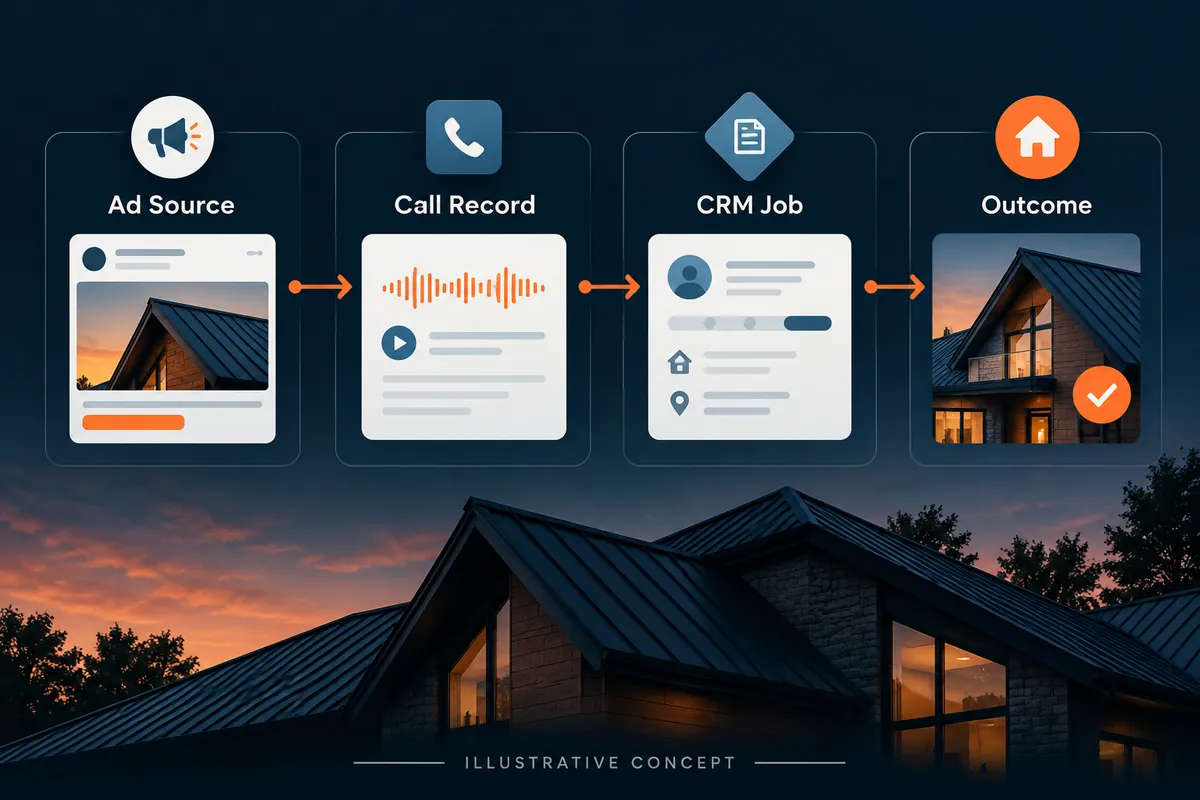
A closed loop means every inquiry carries its source into your CRM, and the outcome (booked inspection, signed contract, payment) is attached back to that source. Then you can compare channels by cost per signed contract, not just cost per lead. This page covers the setup. For the overview, see attribution and ROI tracking.
The Seven Steps
Do them in order. Each depends on the one before.
1. Define outcomes
Agree what counts as an inquiry, accepted lead, booked inspection, signed contract and collected payment. See our lead definitions.
2. Map the pipeline
Create CRM stages and required fields for each outcome, plus a "reason lost" field.
3. Track every source
Call tracking numbers, form tracking, UTM tags, click IDs and tagged Google Business Profile links.
4. Capture identity
Make sure each inquiry creates or matches one CRM contact, with duplicates merged.
5. Send outcomes back
Where supported, import booked or signed outcomes to Google and Meta so bidding can learn.
6. Report and reconcile
Build a dashboard by channel and stage, and check it weekly against your own records.
Outcomes And Pipeline Fields
Without consistent stages, tracking is noise.
| Stage | Required data | Why |
|---|---|---|
| Inquiry | Source, date and time, channel, campaign if known | Source reporting |
| Accepted lead | Accepted or rejected, with a reason | Lead quality by source |
| Booked inspection | Date, estimator, source | Cost per booked inspection |
| Estimate sent | Value, date | Pipeline value |
| Signed contract | Value, date, margin if you track it | Cost per signed contract and revenue return |
| Collected or lost | Payment status, or reason lost | Cash view and learning |
Tracking Every Source
Different channels need different tracking.
| Source | Tracking method | Notes |
|---|---|---|
| Website calls | Call tracking with dynamic numbers that swap by source | Keep your main number consistent where Google requires it, such as on your Google Business Profile |
| Ads | UTM parameters plus click IDs (Google GCLID, Meta FBCLID) saved on the lead | Make sure forms store them in hidden fields |
| Web forms | Form tracking and the same hidden source fields | Test every form after site changes |
| Google Business Profile | Tagged website links, and call and message data from the profile | Profile data is separate; tag it so it appears in reports |
| Local Service Ads | Lead data in Google and your call tracking if available | Match leads to CRM records by phone or message |
| Referrals and walk-ins | A required "how did you hear about us" field | Humans must fill this in consistently |
Identity: One Person, One Record
The same homeowner may call, fill a form and call again from another ad. Decide the rules:
- ✓Match contacts by phone number first, then email
- ✓Merge duplicates and keep the first source plus the latest source
- ✓Pick one attribution rule, such as first touch or last touch, and report it consistently
- ✓Keep an "unmatched" bucket for records you cannot trace, instead of forcing a match
Sending Outcomes Back To Google And Meta
Ad platforms can learn from results beyond the form fill when offline outcomes are sent back, for example through Google Ads offline conversion imports or enhanced conversions for leads, and Meta's Conversions API. Setup details change, so follow each platform's current documentation. Choose which stage to send: a later stage gives better signal but fewer events, so the right choice depends on your volume. Get consent and privacy settings right before sending customer data.
Reporting And Weekly Reconciliation
A useful dashboard shows, by channel: spend, inquiries, accepted leads, booked inspections, signed contracts, revenue and cost at each stage. Every week, check three things against your own records:
- ✓Do call counts match your phone system?
- ✓Do booked inspections in the dashboard match your calendar?
- ✓Do signed contracts match your sales records?
If they do not, fix the setup before trusting the report.
Where Attribution Setups Usually Fail
- ✓Pipeline stages are not updated, so outcomes never reach the report
- ✓Forms drop the click ID or source fields
- ✓Call tracking numbers appear in listings and confuse directory consistency
- ✓Different team members use different stage meanings
- ✓Offline conversions are imported with the wrong value or date
- ✓Nobody owns data quality after launch
Revenue return is not profit. Multiply contract revenue by gross margin before judging a channel.
Consent And Data Handling
Call recording, cookies, text messaging and sending customer data to ad platforms are regulated, and rules vary by state and country. Keep your privacy policy accurate, tell people when calls are recorded where required, honor opt-outs and avoid sending data you are not allowed to share. This is general information, not legal advice.
How Long Setup Takes
When access is available and your pipeline stages are already stable, a basic setup is often done in about two weeks. If your CRM needs cleanup, stages must be agreed first, or several tools must be connected, it takes longer. We confirm the plan after reviewing your current setup.
One Homeowner, Followed Through The Setup
This is a made-up example showing what gets recorded at each step.
| Step | What happens | What is stored |
|---|---|---|
| Click | A homeowner clicks a search ad and lands on a replacement page | Source, campaign, click ID and landing page saved on the visit |
| Call | They call the tracked number shown on the page | Call recorded and tied to the same source |
| CRM record | The call creates or matches a contact | Source, first and latest touch, phone, address |
| Qualification | Your team marks it accepted | Accepted status and job type |
| Inspection | An inspection is booked and held | Booked date, estimator, outcome |
| Estimate | An estimate is sent | Estimate value and date |
| Signed | The homeowner signs | Contract value and date, which can be sent back to the ad platform |
What To Look For In Tracking And CRM Tools
- ✓Call tracking that supports dynamic numbers, recordings and exports
- ✓A CRM that can store source fields, custom stages and a reason lost
- ✓Form tracking that passes hidden fields through
- ✓Reporting that can break results down by channel and stage
- ✓Clear ownership of data and the ability to export it
- ✓Compliant handling of call recording and texting
The tool matters less than whether it is configured and maintained. We can work with your tools or set up R-ROS. See CRM automation.
Two Sources With Their Own Quirks
Google has removed some Business Profile features over time, such as chat and call history, so do not rely on them. Use tagged website links on your profile and your own call tracking where it is allowed, and look at Google's own profile insights as one data point. Local Service Ads leads live in Google's system, so match them to CRM records by phone number or message details, and review leads and credits in the account. See LSA management.
A Test Checklist Before You Trust The Numbers
- Click each ad and landing page, submit the form, and confirm the CRM record has the right source fields.
- Call each tracked number from a phone and confirm the call, recording and source appear.
- Send a message through your Google Business Profile and a Facebook lead form, and confirm they reach the CRM.
- Move a test lead through every pipeline stage and confirm the dashboard updates.
- Check that duplicate contacts merge as designed.
- Review the monthly report layout with the person who will use it.
Five Questions The Monthly Report Should Answer
- ✓Which channels produced booked inspections and signed contracts, not just leads?
- ✓What did each stage cost by channel?
- ✓How many leads were rejected, and why?
- ✓How did response speed affect booking?
- ✓What changed since last month, and what will we change next?
If your current report cannot answer these, it is probably showing activity instead of results.
Roles And Responsibilities
Attribution works when everyone knows their part:
| Who | Responsible for |
|---|---|
| Owner or manager | Agreeing the outcome definitions and reviewing the monthly report |
| Office or sales team | Updating pipeline stages, source and reason lost on every lead, the same day |
| Estimators | Recording inspection results and estimate values |
| Us | Tracking setup, integrations, offline conversion imports, dashboard and weekly data checks |
The most common reason closed-loop reporting fails is not the technology. It is stages that nobody updates.
Related Guides From The Blog
- What Counts as a Roofing Lead? Inquiry, Accepted Lead, Inspection and ContractA four-stage definition of a roofing lead: inquiry, accepted lead, booked inspection and signed contract, why each matters, how to record them in a CRM and how to use the definitions in reports and agency agreements.
- How to Tell if Your Roofing Marketing Is WorkingA practical way for roofing owners to judge marketing results: metrics that matter, what to ignore, a monthly review routine, red flags, how long to wait, and how to read an agency report.
Frequently Asked Questions
Do I need a new CRM for this?
Not necessarily. Your current CRM works if it has consistent stages and can store source fields. We can also set up R-ROS as your CRM. See CRM automation.
What is the minimum setup that is still worth doing?
Call and form tracking, source stored on every lead, and a CRM that records booked inspections and signed contracts. You can add offline conversion imports later.
Can attribution be 100 percent accurate?
No. Some calls and visits cannot be traced. A good setup is honest about an unmatched share and consistent in how it counts.
Will tracking numbers hurt my local SEO?
They can if used inconsistently. Keep your primary number consistent where directories and your profile require it, and use tracking numbers carefully.
Who has to update the CRM?
Your team, ideally with required fields and reminders. Without updated outcomes the loop cannot close.
How often should we review the numbers?
Reconcile weekly during setup, then review by channel monthly.
Get A Free Tracking Review
We will check how leads are tracked today, where the chain breaks between ad click and signed job, and what to fix first.
- ✓Review of call, form and CRM tracking
- ✓Gaps between ads and signed jobs
- ✓No obligation